How DNS Resolution Works (Explained Like a Story)
I learn and explain technology using mind maps to make complex ideas clear and connected. My focus is on understanding how systems work, where assumptions fail, and how small design choices can lead to bigger problems. This space is about learning step by step and building clear, security aware thinking.
What is DNS and why does name resolution exist?
When we type xyz.com in a browser, the internet does not understand the name xyz.com.
Computers understand numbers, which are called IP addresses, such as 192.168.190.12.
Humans find it difficult to remember numbers, and computers find it difficult to remember names.
To solve this problem, humans invented DNS.
DNS stands for Domain Name System.
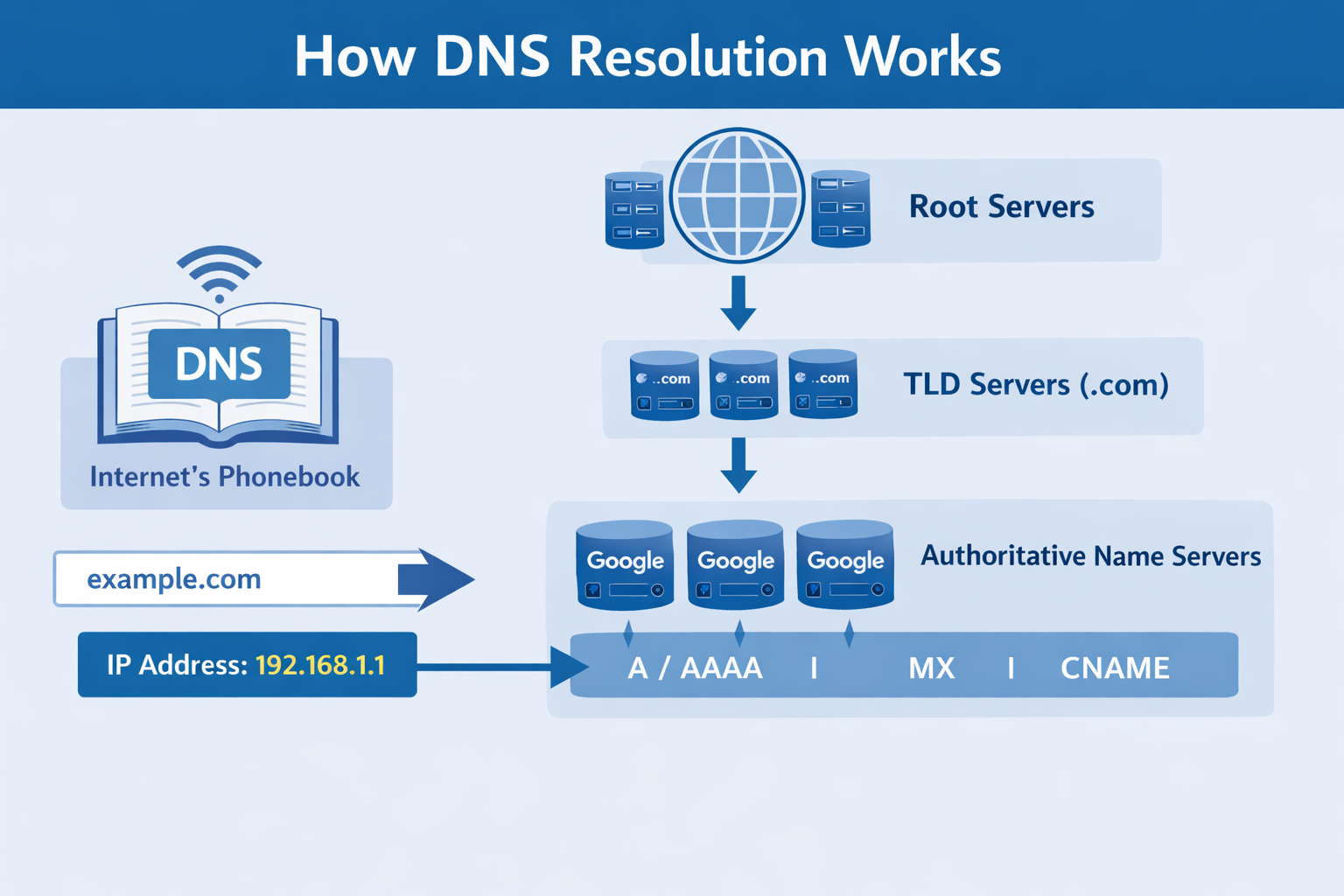
DNS is like the phonebook of the internet.
We remember the name xyz.com and DNS finds the number (IP address) for that name and gives it to the browser. The browser then uses that IP address to communicate with the server.
This process of converting a domain name into an IP address is called DNS resolution or name resolution.
Without DNS, using the internet would feel like dialing a phone number every time you want to visit a website.
What is the dig command and when is it used?
dig stands for Domain Information Groper.
It is a command-line tool used to directly ask questions to DNS servers. Browsers hide DNS resolution from users, but dig shows DNS clearly.
We use dig to:
Understand how DNS resolution works
Debug DNS problems
See which servers answer which DNS questions
Learn system-design-level networking
You can imagine dig as X-ray vision for DNS.
For example, when we run :- dig xyz.com
It does not load a website. It only asks:
“What does DNS know about xyz.com?”
When I first explored DNS using the dig command, the layered flow became much clearer.
Understanding dig . NS and root name servers
Let’s start at the very top of DNS.
When we run :- dig . NS
We are asking :- “Who controls the root of DNS?”
The dot ( . ) represents the DNS root.
Root name servers do not know the IP addresses of websites. Their job is very simple. They only know where to go next.
Their response is like :- “I don’t know the answer, but for .com, talk to these servers.”
This is the first layer of DNS resolution.
Understanding dig com NS and TLD name servers
Now we go one level down.
When we run :- dig com NS
We are asking :- “Who manages the .com domain?”
These are called TLD (Top-Level Domain) name servers.
TLD servers also do not know the IP address of xyz.com. Their job is to say :- “I don’t know xyz.com’s IP, but these servers control xyz.com.”
So the flow becomes:
Root points to .com
.com points to xyz.com’s authoritative servers
This layered design keeps DNS fast and scalable.
Understanding dig xyz.com NS and authoritative name servers
Now we reach the owners of the domain.
When we run :- dig xyz.com NS
We are asking :- “Which name servers are authoritative for xyz.com?”
Authoritative name servers are controlled by the domain owner. These servers store the actual DNS records and give the final answers.
They know:
A records
AAAA records
MX records
TXT records
This is where the truth lives in DNS.
Understanding dig xyz.com and the full DNS resolution flow
When we run :- dig xyz.com
It usually asks for the A record by default.
Behind the scenes, this is what happens:
Our system asks a recursive resolver
The resolver asks the root servers
Root servers reply with .com servers
Resolver asks the TLD servers
TLD servers reply with authoritative servers
Resolver asks the authoritative server
Authoritative server returns the IP address
Resolver caches the answer
Browser connects to the IP address
All of this happens in milliseconds. We only see the final IP, but DNS does the entire journey.
How recursive resolvers work behind the scenes
Our browser does not talk to root or TLD servers directly. A recursive resolver does the hard work for us.
Its responsibilities are:
Walking through the DNS hierarchy
Caching DNS results
Reducing load on root and TLD servers
Answering faster next time
This is why the first visit to a website is often slower, and the second visit is faster.
Caching is the silent hero of DNS.
Why NS records matter so much
NS (Name Server) records tell DNS :- “Who is responsible for this domain?”
Without NS records:
DNS would not know where to go next
DNS resolution would fail
Websites would stop working
NS records are directions, not destinations.
Connecting dig xyz.com to real-world browser requests
When we type a website in the browser:
Browser triggers DNS resolution
Recursive resolver finds the IP address
Browser sends an HTTP or HTTPS request
Web server responds with data
DNS happens before any web request.
No DNS means no website.
DNS resolution as a layered mental model
Always think of DNS in layers:
Root layer knows TLD servers
TLD layer knows authoritative servers
Authoritative layer knows actual DNS records
Each layer answers only what it is responsible for. This design prevents overload, enables global scale, and makes DNS resilient.
The best way to remember DNS
DNS is not magic.
DNS is organized delegation.
Each level says :- “I don’t know everything, but I know who does.”
If you understand this idea, you understand DNS better than most programmers.